

CEE Relays Ltd
|
|
Tel:
+44 1753 576477
Fax: +44 1753 825661
Standalone program: Ground Mat (Electrical Grounding Analysis)
SKM GroundMat is a program for substation earth grid design and analysis. It is designed to help optimise grid design or reinforce existing grids of any shape. It uses a general-purpose finite element algorithm for potential analysis and graphical facilities to validate ground system efficiency.
A full brochure describing this program is available in PDF format via the link at the bottom of this page.
A full brochure describing this program is available in PDF format via the link at the bottom of this page.
Benefits
- Design safer and more cost-effective earth grids.
- Save time with graphical entry and display.
- Communicate designs more easily with professional reports and graphs.
- Evaluate alternatives quickly and easily to establish an optimal design.
- Save time with design wizard capabilities.
- PTW GroundMat is an important tool every power system engineer should have.
Solution Algorithms
- Finite element analysis of the earth conductors.
- Finite element analysis of the earth rods.
- Grid conductor current displacement using Matrix analysis.
Analysis Options
- Earth model analysis from field measurements.
- User-specified fault current.
- Grid and earth potential analysis.
- Ability to analyse multiple ground systems.
- Ability to analyse the potential rise for each grounding system including neighbouring passive grids or rods.
- Safety analysis including surface materials, based on body weight and exposure time.
- Option to use IEEE Std. 80 or IEC Std. 479 for safety analysis.
- Calculation of maximum permissible touch and step voltages.
- Comprehensive report for grid and rod configuration.
- Comprehensive report for surface potential analysis featuring station data and currents diffused to earth by the grid elements.
- Danger point evaluation.
- Touch voltage, step voltage, and earth potential analysis.
Interface Options
- Create and store alternative designs with a simple copy/paste.
- Data entry for grid and rods in spreadsheet format.
- Data entry for earth model in spreadsheet format.
- Grid/rod/profile wizards to setup initial system.
- 3D/2D representation of grid and rod configuration.
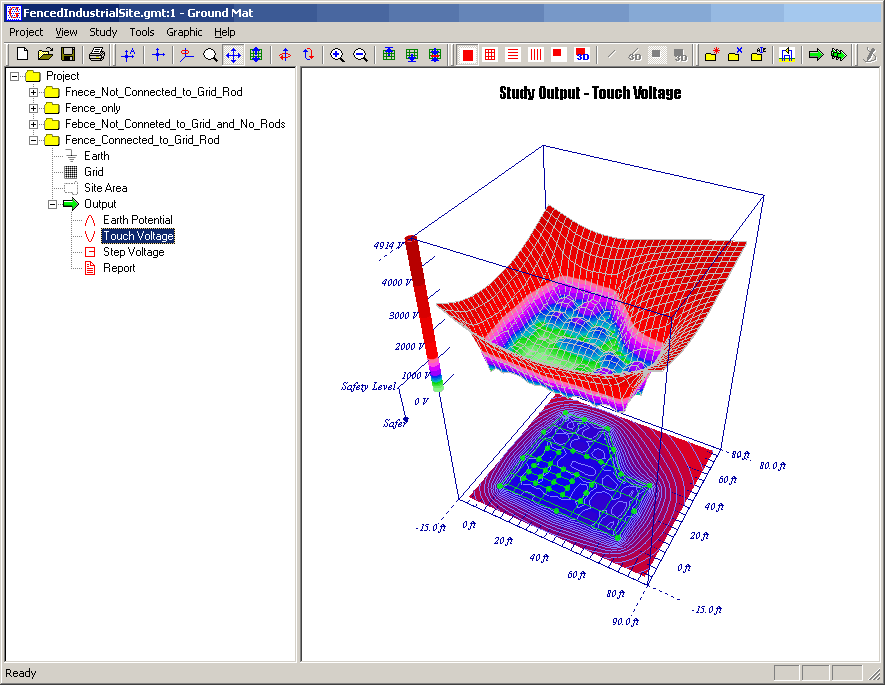
- 3D display of touch voltage, step voltage, and earth potential plots.
- Report viewer for text reports.
- Cut, copy and paste grid/rod segments in spreadsheet.
- Range-checking for simulation parameters.
- User-defined thresholds for danger area evaluation.
- User-defined colour coding for graphical safety analysis.
- Metric and English units.
- Group print function.
Project Setup Options
- Stores multiple study revisions for each project.
- Expanding tree structure to manage project revisions.
- Input data and output results saved for each study.
- Copy, paste and rename study revisions to compare alternative designs.
- Run studies for multiple study revisions as a single action.
A downloadable version of the Ground Mat brochure is available here.
PDF 0.1Mb
